For the impatient, click HERE
This post assumes basic understanding of Jujutsu version control system.
The need to merge two repositories such that their histories stay preserved is more common than one might think. One situation is vendoring a third party dependency to your repository, in order to evade working with notorious submodules. Usually (but not necessarily) that dependency is imported to a subdirectory of the destination repository.
The other situation, which I personally encountered in 2024, is migrating multiple repositories to a single monorepo… which you can think of as vendoring first party dependencies (:
What we’re trying to do here is have a commit that a) has two parents, one for the dependency and another for the destination repo (also known as a merge commit), and b) the contents of that commit should be the destination repo with files of the dependency in a subdirectory. And while Linus Torvalds calls merges like these evil merges I actually think they’re really neat for this exact purpose. 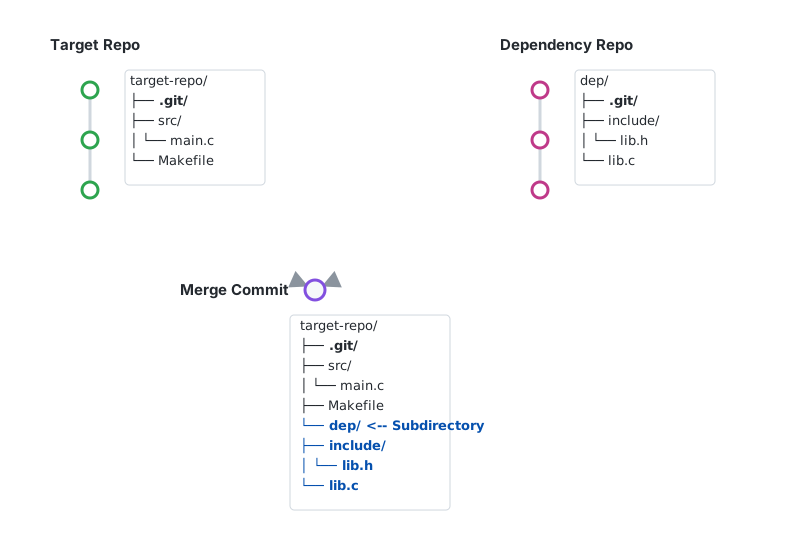
dep repo is in the subdirectory of the target repo.
SVG authored by Gemini 3.1 Pro
Side quest: doing it with git
Let me be your personal ${SEARCH_ENGINE} results page and show you some of the approaches of merging two repositories’ histories such that one ends up in a subdirectory:
git merge --allow-unrelated-histories- only if you don’t have conflictingly named files (or you like resolving git conflicts)
- That, however, is exceedingly rare, since repositories tend to have many similarly named files (
README,LICENSE,src/…) - Also, it just merges all files together so you end up with this soup of files with different origins, not another repo as a subdir
- Use
git-filter-branchor its speedier cousingit-filter-repo- Rewrites the history such that one of the repositories was always in a subdirectory
- However, we want to save the history and keep all the hashes, not recalculate them
- submodules
- I don’t like submodules
- subtrees
- Frankly, I never used them.
- They do seem promising, but I don’t really have a need to keep the subtree as a separate project and upstream changes to it.
- Besides, I’m trying to showcase jj here 😛
- https://avasdream.engineer/merging-multiple-repositories-into-monorepo
- Uses plumbing commands like
git read-tree - It does work, but seems very complex, manual, and error prone
- Uses plumbing commands like
- https://blog.merovius.de/posts/2022-12-08-cleanly-merge-git-repositories/
- Same as the previous entry, but seemingly even lower level in the abstraction hierarchy 🤨
So out of 6 entries, 2 of them don’t work at all, 2 of them can be made to work, 1 is what just might do what I need and 1 is what I’m not going anywhere near to.
Let’s switch back to step-by-step guide on doing it with jj. A lot has been written already about jj on the Internets, and I won’t be repeating all the points, but I find its CLI really intuitive and aligned with my mental model of source version control, and I truly enjoy doing graph theory shenanigans with it. This is one of them.
Step by step
There are really only three steps to do it:
- fetch all repositories locally
- prepare one of the repositories
- rebase the change to the other one
It’s best to try this out with an example so I’ll show you how I migrated most of my important repositories to a monorepo. I used to have different repositories for personal website, personal blog, and a third repository that had shared functionality, primarily CSS and cookie storage data. I now keep everything in my monorepo and link that shared directory as a local dependency.
1. Fetch all repositories locally
You should have both the target repository and the other repository locally under different remotes. Here’s how I did it:
$ jj git remote add personal-website git@github.com:InCogNiTo124/personal-website.git

$ jj git remote add personal-reusables git@github.com:InCogNiTo124/personal-reusables.git

$ jj git remote list
personal-reusables git@github.com:InCogNiTo124/personal-reusables.git
personal-website git@github.com:InCogNiTo124/personal-website.git

$ jj git fetch --all-remotes
remote: Enumerating objects: 202, done.
remote: Total 202 (delta 64), reused 177 (delta 51), pack-reused 0 (from 0)
remote: Enumerating objects: 1565, done.
remote: Total 1565 (delta 3), reused 0 (delta 0), pack-reused 1557 (from 1)
bookmark: master@personal-reusables                       [new] untracked
bookmark: master@personal-website                         [new] untracked
[...]
We’ll be making a new change on top of two main bookmarks, master@personal-website and master@personal-reusables.
2. prepare one of the repositories
By “preparing”, in this scenario I mean to move the dependency, in my case personal-reusables, into a separate directory. You might have something more complex.
$ jj new master@personal-reusables
Working copy (@) now at: kzmmukoo 96af1229 (empty) (no description set)
Parent commit (@-) : rtltllyx 2dfe4841 master@personal-reusables | Migrate to svelte 5
Added 42 files, modified 0 files, removed 0 files
$ lsd -lah
drwxr-xr-x msmetko msmetko 80 B Tue Feb 17 21:08:21 2026 .jj/
drwxr-xr-x msmetko msmetko 120 B Tue Feb 17 21:25:18 2026 lib/
drwxr-xr-x msmetko msmetko 140 B Tue Feb 17 21:25:18 2026 static/
.rw-r--r-- msmetko msmetko 350 B Tue Feb 17 21:25:18 2026 README.md
$ mkdir -v personal-reusables
mkdir: created directory 'personal-reusables'
$ mv -v lib static README.md personal-reusables/
renamed 'lib' -> 'personal-reusables/lib'
renamed 'static' -> 'personal-reusables/static'
renamed 'README.md' -> 'personal-reusables/README.md'
Now we’re ready to finally merge the repository histories
3. rebase the change
The final moment is a bit anticlimactic as it’s, literally, only one command1:
$ jj rebase -r @ -o @- -o master@personal-website
Rebased 1 commits to destination
Working copy  (@) now at: kzmmukoo 0f375680 (no description set)
Parent commit (@-)      : rtltllyx 2dfe4841 master@personal-reusables | Migrate to svelte 5
Parent commit (@-)      : ovxlkzxx 0e02edf2 master@personal-website | (empty) Merge pull request #191 from InCogNiTo124/renovate/lock-file-maintenance
Added 32 files, modified 0 files, removed 0 files
Let’s unpack the command just a little so it’s a bit less magic:
jj rebase: command that, perhaps surprisingly, rebases a change-r @: rebase the current change (kzmmukoo)-o @-: rebase on top of current change’s parent.- If you think about it for a bit, @’s parent is already @- so this is, in isolation, pretty much a no-op.
-o master@personal-website: also rebase on top ofmaster@personal-website.- The nice thing about
-ois that it can be repeated! This means that all-ochanges will be parents of-r. Equivalently,-rwill be the children of all-ochanges. Neat!2
- The nice thing about
- The output of the command confirms that the change
kzmmukoonow has 2 parents@-, one is from the source repository, and the other is for the destination repository
And there you have it, we created a change that has histories of two repositories as parents. You can also validate that by, for example, running jj log -r 'ancestors(@, 5)' :
$ jj log -r 'ancestors(@, 5)'
@    kzmmukoo msmetko@msmetko.xyz 2026-02-17 21:33:24 0f375680
├─╮  (no description set)
│ ◆    ovxlkzxx msmetko@msmetko.xyz 2024-11-10 18:42:57 master@personal-website 0e02edf2
│ ├─╮  (empty) Merge pull request #191 from InCogNiTo124/renovate/lock-file-maintenance
│ │ ◆  zmrszpzu 29139614+renovate[bot]@users.noreply.github.com 2024-11-10 18:42:00 renovate/lock-file-maintenance@personal-website 5d2a6891
│ ├─╯  chore(deps): lock file maintenance
│ ◆    qyooponn msmetko@msmetko.xyz 2024-11-10 18:37:00 72f4ea0f
│ ├─╮  (empty) chore(config): migrate renovate config
│ │ ◆  kvsomwuw 29139614+renovate[bot]@users.noreply.github.com 2024-11-10 18:35:29 59a0896c
│ ├─╯  chore(config): migrate config .github/renovate.json
│ ◆    xmuwpyuo msmetko@msmetko.xyz 2024-11-10 15:05:11 2de53adb
│ ├─╮  (empty) Merge pull request #189 from InCogNiTo124/renovate/all
│ │ ◆  wovwqnot 29139614+renovate[bot]@users.noreply.github.com 2024-11-10 02:41:52 09b3d5e0
│ ├─╯  chore(deps): update all dependencies
│ ◆  qkulpnzw msmetko@msmetko.xyz 2024-11-03 21:18:27 53bb0af1
│ │  (empty) Merge pull request #188 from InCogNiTo124/renovate/major-all
│ ~
│
◆  rtltllyx msmetko@msmetko.xyz 2024-11-10 17:50:54 master@personal-reusables 2dfe4841
│  Migrate to svelte 5
◆    xyouttxu msmetko@msmetko.xyz 2024-08-06 10:06:43 c0814896
├─╮  (empty) Merge pull request #1 from InCogNiTo124/width-fix
│ ◆  tlqmunmy msmetko@msmetko.xyz 2024-08-05 22:26:48 3a2f8bd8
├─╯  Increase content width from 650 to 720 px
◆  txsmnyvw msmetko@msmetko.xyz 2023-05-28 14:05:58 7b733cde
│  Refresh images
◆  xumusqzs amalija@netgen.io 2022-10-09 08:14:27 30dbbb97
│  use new variables
~
Sorry I don’t have a proper syntax highlighting :) but if you squint here, you can totally see two separate chains going on and on and on.
The best part is, thanks to jj, you can totally just continue editing this change and it’ll still have the same parents. For example, my next step was moving all files originating from the personal-website to a personal-website directory, which took a minute, and then reconfiguring the code to look at the new locations, which took hundreds more :)
Bonus: merging a third, secret, repository
Let’s say you’re feeling really frisky and that you might even be in the mood for merging three repositories. I did mention I had a personal blog that shared that code so it may as well be a part of the monorepo…
I won’t be reproducing all the steps, but let’s assume we start from a state where both projects are in their own directory and we’re ready to merge with the third repository:
$ lsd -lah
drwxr-xr-x msmetko msmetko 80 B Tue Feb 17 21:08:21 2026 .jj
drwxr-xr-x msmetko msmetko 100 B Tue Feb 17 22:15:15 2026 personal-reusables
drwxr-xr-x msmetko msmetko 360 B Tue Feb 17 22:15:15 2026 personal-website
$ jj log
@ kzmmukoo msmetko@msmetko.xyz 2026-02-17 22:10:23 cfaa577d
├─╮ (no description set)
│ ◆ ovxlkzxx msmetko@msmetko.xyz 2024-11-10 18:42:57 master@personal-website 0e02edf2
│ │ (empty) Merge pull request #191 from InCogNiTo124/renovate/lock-file-maintenance
│ ~ (elided revisions)
◆ │ rtltllyx msmetko@msmetko.xyz 2024-11-10 17:50:54 master@personal-reusables 2dfe4841
│ │ Migrate to svelte 5
~ │ (elided revisions)
├─╯
◆ zzzzzzzz root() 00000000
$ jj git remote list
personal-blog git@github.com:InCogNiTo124/personal-blog.git
personal-reusables git@github.com:InCogNiTo124/personal-reusables.git
personal-website git@github.com:InCogNiTo124/personal-website.git
Now, simply run the same command3:
$ jj rebase -r @ -o @- -o master@personal-blog
Rebased 1 commits to destination
Working copy  (@) now at: kzmmukoo 80756c82 (no description set)
Parent commit (@-)      : ovxlkzxx 0e02edf2 master@personal-website | (empty) Merge pull request #191 from InCogNiTo124/renovate/lock-file-maintenance
Parent commit (@-)      : rtltllyx 2dfe4841 master@personal-reusables | Migrate to svelte 5
Parent commit (@-)      : xxkvttlr 0ad8251f master@personal-blog | fix(posts/sampling): fix the date
Added 95 files, modified 1 files, removed 0 files
Works like a charm, right out of the box 🎉
I genuinely don’t know neither 1) how would I do that with git right at the top off my head, nor 2) how many tries and do-overs would I need in order to merge three unrelated git histories. If someone has a knack for self-inflicted learning opportunities, let me know if you somehow manage to do that and I’ll immortalize your attempt here!
-
This works because jj has a single
root()commit underlying every jj repo. This actually means all jj repos have the same parent, like mine repos, your repos, and even repos that don’t exist yet. All of them sharezzzzzzparent. ↩ -
the command can be made even more compact thanks to the power of revsets. Instead of repeating
-oflag, we could dojj rebase -r '@' -o '@- | master@personal-blog'. Neater! ↩ -
I am aware that technically that is not exactly the same command, thank you ↩